Lab frame: rotating object instead of rotating detector
In the previous tutorials, the object remained static while the detector was moving. This is the conventional way in which the ASTRA-toolbox models tomography. In practice however, it is often the case that the object is mounted on a rotation stage in front of a static detector. It is useful to model the geometries like this in software as well, because it makes it easier to adjust parameters like the center of rotation and the relative location of the detector relative to the object.
In this tutorial, we will use geometric transforms to rotate the object. Geometric transforms are described in the Geometric transforms topic guide. In addition, this will be the first time we use a vector geometry, which is a geometry that is less restricted in its movement and can be arbitrarily oriented. Geometries and vector geometries are described in the Geometries topic guide.
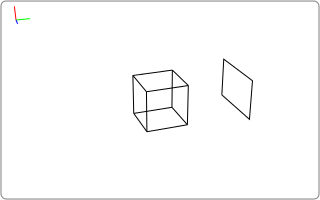
First, let’s create a static volume and a static parallel-beam detector geometry:
import tomosipo as ts
import numpy as np

vg = ts.volume(pos=0, size=1)
pg = ts.parallel_vec(
    shape=1,
    ray_dir=(0, 1, 0),
    det_pos=(0, 2, 0),
    det_v=(1.0, 0, 0),
    det_u=(0, 0, 1.5),
)
svg = ts.svg(vg, pg)
svg.save("./doc/img/intro_lab_frame_0.svg")
Note
The volume and detector consist of a single voxel and a single pixel, which is fine for the purpose of illustration. If you want to reconstruct real data, edit the shape parameter.
As you can see, we have created a detector that is slightly wider than it is high, which is located at 2 units away from the volume along the y axis. Note that the order of the axes is Z, Y, X, as described in Units, axes and indexing.
We can create a rotation transform as follows:
angles = np.linspace(0, np.pi, 10, endpoint=False)
R = ts.rotate(pos=(0, 0, 0), axis=(1, 0, 0), angles=angles)
This rotation transform is an object that can be multiplied with a geometry to move it:
vg_rot = R * vg.to_vec()
svg = ts.svg(vg_rot, pg)
svg.save("./doc/img/intro_lab_frame_rot.svg")
We create the rotating volume geometry vg_rot by applying the rotation R to vg. Before applying the rotation, we convert the volume geometry to a vector volume geometry. This is because a volume geometry cannot represent all possible positions and orientations. If you forget to convert to a vector geometry, the code issues a warning and converts the volume geometry to a vector volume geometry automatically. The resulting geometry is shown in the figure below.
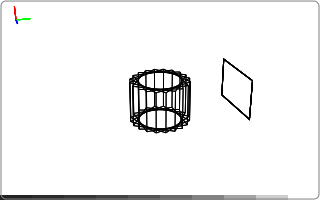
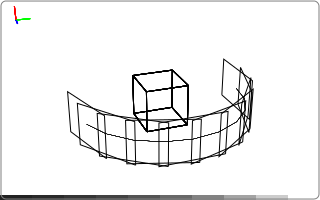
The rotating volume geometry and the detector geometry can be used to define a tomographic operator. Internally, the rotating volume is “unrotated” and the projection geometry is moved accordingly so that the volume is fixed on the origin and axis-aligned again. This is necessary to use the ASTRA-toolbox’s fast GPU kernels.
>>> A = ts.operator(vg_rot, pg)
>>> A.domain_shape
(1, 1, 1)
>>> A.range_shape
(1, 10, 1)
As you can see, the domain_range is consistent with a static single voxel volume, and the range_shape is consistent with a 10-angle single pixel projection geometry.
You can plot these geometries as follows:
svg = ts.svg(A.astra_compat_vg, A.astra_compat_pg)
svg.save("./doc/img/intro_lab_frame_astra_compat.svg")
Using these tools, you can easily define a tomographic operator where you can adjust the: * pixel size, * detector position, * center of rotation, * rotation angles, and * voxel size.
The following snippet can serve as a template:
import tomosipo as ts
import numpy as np

# First define projection geometry
pixel_size = 1.0
detector_shape = (10, 10)
detector_position = (0, 2, 0)

pg = ts.parallel_vec(
    shape=detector_shape,
    ray_dir=(0, 1, 0),
    det_pos=detector_position,
    det_v=(pixel_size, 0, 0),
    det_u=(0, 0, pixel_size),
)

# Then define volume geometry
volume_shape = np.array([1, 1, 1])
voxel_size = np.array([1.0, 1.0, 1.0])
num_angles = 10
angles = np.linspace(0, np.pi, num_angles, endpoint=False)
rot_axis_pos = (0, 0.1, 0.2)

vg0 = ts.volume(
    shape=volume_shape,
    pos=(0, 0, 0),
    size=volume_shape * voxel_size,
)
R = ts.rotate(pos=rot_axis_pos, axis=(1, 0, 0), angles=angles)
vg = R * vg0.to_vec()

A = ts.operator(vg, pg)
For more templates of common geometries, see Standard geometry templates.