Geometries
Units, axes and indexing
Tomosipo follows NumPy’s indexing convention. In the image below, we display the coordinate axes and indexing into a volume cube. The Z-axis points upward.
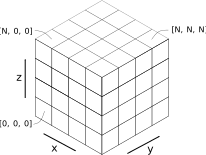
As you can see, the first coordinate indexes in the z direction, the second coordinate in the y direction, and the third coordinate in the x direction. By default, each voxel has a “physical size” of 1 unit. The voxel’s height, width, and depth can be customized arbitrarily, however.
We display an example for a parallel geometry with its associated sinogram indexing below. The detector coordinate frame is defined by two vectors
u: Usually points sideways and to the “right” from the perspective of the source. The length of u defines the width of a detector pixel.
v: Usually points upwards. The length of v defines the height of a detector pixel.
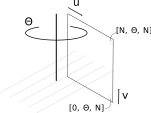
Here, we see that the order of the physical dimensions does not match the order of the data indices. For performance reasons, projection data is stored as a sinogram stack indexed in (v, angle, u) order. The projection geometry coordinates are (angles, v, u), however. The size of a detector pixel can be arbitrary and is defined by the u and v vectors.
In short:
Volume geometry and data are indexed in (z, y, x) order.
Projection geometries are indexed in (angle, v, u) order.
Projection data is stored as a sinogram stack, indexed in (v, angle, u) order.
Note
The coordinate system (z, y, x) is left-handed rather than right-handed.
Indexing
In tomosipo, it is not just data arrays that can be indexed, but geometries can be indexed as well! This makes it considerably easier to reconstruct or describe a subset of your data.
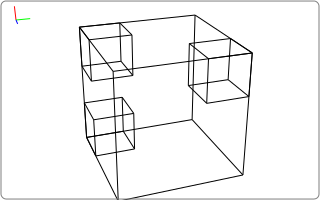
We can recreate the above figure using tomosipo by sub-indexing a larger volume and showing the subvolumes:
>>> import tomosipo as ts
>>> vg = ts.volume(shape=3)
>>> svg = ts.svg(vg, vg[0, 0, 0], vg[2, 0, 0], vg[2, 2, 2])
>>> svg.save("./doc/img/topics_geometries_indexing.svg")
>>> vg[0, 0, 0]
ts.volume(
    shape=(1, 1, 1),
    pos=(-1.0, -1.0, -1.0),
    size=(1.0, 1.0, 1.0),
)
>>> vg[2, 0, 0]
ts.volume(
    shape=(1, 1, 1),
    pos=(1.0, -1.0, -1.0),
    size=(1.0, 1.0, 1.0),
)
>>> vg[2, 2, 2]
ts.volume(
    shape=(1, 1, 1),
    pos=(1.0, 1.0, 1.0),
    size=(1.0, 1.0, 1.0),
)
Overview of geometries
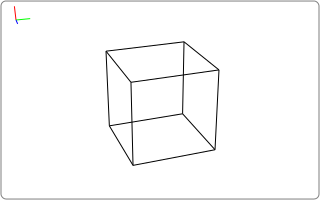
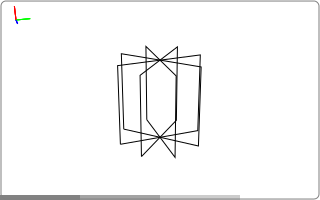
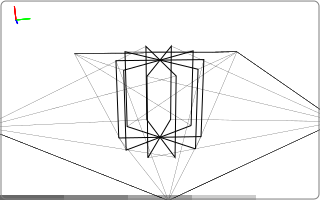
At the most basic level, tomosipo can represent a boxed volume, a parallel beam, and a cone beam geometry. These are displayed below
import tomosipo as ts
vol = ts.volume(shape=2)
par = ts.parallel(angles=4, shape=2)
cone = ts.cone(angles=5, shape=2, cone_angle=1 / 2)

ts.svg(vol).save("./doc/img/topics_geometries_vol.svg")
ts.svg(par).save("./doc/img/topics_geometries_par.svg")
ts.svg(cone).save("./doc/img/topics_geometries_cone.svg")
Creation function |
Geometry |
|---|---|
3D circular parallel beam geometry |
|
3D circular cone beam geometry |
|
3D axis-aligned volume geometry |
In addition, tomosipo also can represent arbitrarily oriented versions of these geometries. These are known as vector geometries and can be created using the to_vec() method:
>>> vol.to_vec()
ts.volume_vec(
    shape=(2, 2, 2),
    pos=array([[0., 0., 0.]]),
    w=array([[1., 0., 0.]]),
    v=array([[0., 1., 0.]]),
    u=array([[0., 0., 1.]]),
)
Usually, it is not necessary to create vector geometries manually by specifying their coordinate axes manually. In tomosipo, it is easier to start with a basic geometry and transform it using geometric transforms, as described in TODO. If you need to manually define vector geometry, use the following functions:
Creation function |
Geometry |
|---|---|
3D arbitrarily-oriented parallel beam geometry |
|
3D arbitrarily-oriented cone beam geometry |
|
3D arbitrarily-oriented volume geometry. |
Geometry creation
Creation of circular projection geometries
The following conventions are used:
The size and shape parameters can be provided as a single float, resulting in a square detector, or as a tuple containing the height and width of the detector.
>>> import numpy as np
>>> import tomosipo as ts
>>> ts.parallel(shape=2, size=2).det_shape
(2, 2)
When size is not provided, it is taken to be equal to the shape, i.e., the detector pixel size is equal to one in each dimension by default.
>>> ts.parallel(shape=2).det_size
(2.0, 2.0)
The angles parameter can be provided as a single integer. This is automatically expanded to a half circle arc (
ts.parallel()) or full circle arc (ts.cone()).>>> ts.parallel(angles=5).angles / np.pi array([0. , 0.2, 0.4, 0.6, 0.8]) >>> ts.cone(angles=5, cone_angle=1 / 2).angles / np.pi array([0. , 0.4, 0.8, 1.2, 1.6])
An array of angles can also be provided, in units of radians.
>>> angles = np.linspace(0, np.pi, 5, endpoint=True)
>>> ts.parallel(angles=angles).angles
array([0.        , 0.78539816, 1.57079633, 2.35619449, 3.14159265])
Creation of volume geometries
Volume geometries can be created in a similar way to projection geometries. Volume geometries do not rotate by default, so no angles argument has to be provided. By default, volume geometries are centered on the origin. A different center can be chosen by providing the pos argument.
>>> ts.volume(shape=1)
ts.volume(
    shape=(1, 1, 1),
    pos=(0.0, 0.0, 0.0),
    size=(1.0, 1.0, 1.0),
)
>>> ts.volume(shape=10, size=1.0)
ts.volume(
    shape=(10, 10, 10),
    pos=(0.0, 0.0, 0.0),
    size=(1.0, 1.0, 1.0),
)
>>> ts.volume(shape=10, size=.1, pos=(0.5, 0.5, 0.5))
ts.volume(
    shape=(10, 10, 10),
    pos=(0.5, 0.5, 0.5),
    size=(0.1, 0.1, 0.1),
)
Useful properties of geometries
Printed representation
Geometries have a useful representation when printed:
>>> import tomosipo as ts
>>> pg = ts.parallel(angles=3, shape=(10, 15), size=(1, 1.5))
>>> pg
ts.parallel(
    angles=3,
    shape=(10, 15),
    size=(1.0, 1.5),
)
Angles, shape, and size
There are a number of useful properties to query a created geometry. These are listed below.
|
The number of angles in the projection geometry |
|
The number of orientations in the geometry |
|
The angles from which projections are acquired. |
|
The shape of the detector. |
|
The size of the detector. |
|
The size of each detector. |
For projection geometries, num_steps can be used interchangeable with num_angles. The properties angles is supported for ts.parallel and ts.cone only. In a vector geometry, not all pixels have to be the same size. In that case, det_sizes can be used to determine the detector size at each angle.
>>> pg.num_angles # number of angles
3

>>> pg.angles
array([0.        , 1.04719755, 2.0943951 ])

>>> pg.det_shape
(10, 15)

>>> pg.det_size
(1.0, 1.5)

>>> pg.det_sizes
array([[1. , 1.5],
       [1. , 1.5],
       [1. , 1.5]])
Cone, parallel, vec
The following properties determine whether the geometry is a cone beam or parallel beam geometry and whether or not it is a vector geometry.
|
Is this geometry a cone-beam geometry? |
|
Is this geometry a parallel-beam geometry? |
|
Is this a vector geometry? |
>>> pg.is_parallel, pg.is_cone, pg.is_vec
(True, False, False)
Coordinates for geometric calculations
Specific coordinates, such as position (center of detector), u, v, corners, detector normal, the lower left corner, etc.
|
Returns a vector with the corners of each detector |
|
The detector normal vectors of the geometry. |
|
The detector positions of the geometry. |
|
The detector u-vectors of the geometry. |
|
The detector v-vectors of the geometry. |
|
Returns a vector with the positions of the lower-left corner the detector |
|
The ray direction of the geometry. |
|
The source positions of the geometry. |
Of these properties, src_pos is only supported on cone and cone_vec geometries and ray_dir is only supported on parallel and parallel_vec geometries.
>>> pg.corners
array([[[-0.5       ,  0.        , -0.75      ],
        [ 0.5       ,  0.        , -0.75      ],
        [-0.5       ,  0.        ,  0.75      ],
        [ 0.5       ,  0.        ,  0.75      ]],

       [[-0.5       , -0.64951905, -0.375     ],
        [ 0.5       , -0.64951905, -0.375     ],
        [-0.5       ,  0.64951905,  0.375     ],
        [ 0.5       ,  0.64951905,  0.375     ]],

       [[-0.5       , -0.64951905,  0.375     ],
        [ 0.5       , -0.64951905,  0.375     ],
        [-0.5       ,  0.64951905, -0.375     ],
        [ 0.5       ,  0.64951905, -0.375     ]]])

>>> pg.det_normal
array([[ 0.        ,  0.01      ,  0.        ],
       [ 0.        ,  0.005     , -0.00866025],
       [ 0.        , -0.005     , -0.00866025]])

>>> pg.det_pos
array([[0., 0., 0.],
       [0., 0., 0.],
       [0., 0., 0.]])

>>> pg.det_u
array([[ 0.        ,  0.        ,  0.1       ],
       [ 0.        ,  0.08660254,  0.05      ],
       [ 0.        ,  0.08660254, -0.05      ]])

>>> pg.det_v
array([[0.1, 0. , 0. ],
       [0.1, 0. , 0. ],
       [0.1, 0. , 0. ]])

>>> pg.lower_left_corner
array([[-0.5       ,  0.        , -0.75      ],
       [-0.5       , -0.64951905, -0.375     ],
       [-0.5       , -0.64951905,  0.375     ]])

>>> pg.ray_dir
array([[ 0.       , -1.       ,  0.       ],
       [ 0.       , -0.5      ,  0.8660254],
       [ 0.       ,  0.5      ,  0.8660254]])