Geometric transforms
The geometries introduced in the previous chapter can be moved and manipulated using geometric transforms. The transforms can perform actions such as translation and rotation. In this topic guide, we introduce the various transforms available in tomosipo and show how to use them.
Using transforms
The transform creation functions, such as ts.translate, do not perform an
actual geometric transformation. Rather, they return an object that can be used
to perform actual geometric transformations. In addition, the transform objects
can be composed to create more complex motions. This design makes it possible to
build complex systems from simple foundations. In this section, we explain how
this works in practice.
Creating a transform
A Transform represents a geometric
transformation by a 4-by-4 matrix using homogeneous coordinates.
These matrices are commonly used in graphics programming and can represent
translation, rotation, scaling, reflection, and a host of other transformations.
The code below shows an example of such a matrix used for translation.
>>> import tomosipo as ts
>>> T = ts.translate((1, 2, 3))
>>> T
Transform(
    [[[1. 0. 0. 1.]
  [0. 1. 0. 2.]
  [0. 0. 1. 3.]
  [0. 0. 0. 1.]]]
)
Move an object
You can use the transformation to move an object as follows:
>>> vg = ts.volume(shape=1)
>>> T * vg
ts.volume(
    shape=(1, 1, 1),
    pos=(1.0, 2.0, 3.0),
    size=(1.0, 1.0, 1.0),
)
As you can see, the volume has moved from its original position on the origin to
position (1, 2, 3). You can move any geometry in tomosipo by multiplying with
a Transform.
Composing transforms
In addition to moving geometries, you can multiply transforms with each other to obtain a composed transform. In the code below, we create a translation to move the object back to the origin.
>>> T2 = ts.translate((-1, -2, -3))
>>> T2 * T
Transform(
    [[[1. 0. 0. 0.]
  [0. 1. 0. 0.]
  [0. 0. 1. 0.]
  [0. 0. 0. 1.]]]
)
>>> T2 * T * vg
ts.volume(
    shape=(1, 1, 1),
    pos=(0.0, 0.0, 0.0),
    size=(1.0, 1.0, 1.0),
)
As you can see, the composed transform T2 * T is represented by the identity matrix. Also, the volume is moved back to the origin.
Inverting transforms
In general, any transform can be undone by multiplying with its inverse:
>>> T * T.inv
Transform(
    [[[1. 0. 0. 0.]
  [0. 1. 0. 0.]
  [0. 0. 1. 0.]
  [0. 0. 0. 1.]]]
)
Movement over time
So far, we have used a single transformation. In practice, you probably want to apply multiple transformations over time. This is possible in tomosipo:
>>> T = ts.translate((1, 0, 0), alpha=[0.0, 1.0, 2.0])
>>> T.num_steps
3
>>> T * vg.to_vec()
ts.volume_vec(
    shape=(1, 1, 1),
    pos=array([[0., 0., 0.],
       [1., 0., 0.],
       [2., 0., 0.]]),
    w=array([[1., 0., 0.],
       [1., 0., 0.],
       [1., 0., 0.]]),
    v=array([[0., 1., 0.],
       [0., 1., 0.],
       [0., 1., 0.]]),
    u=array([[0., 0., 1.],
       [0., 0., 1.],
       [0., 0., 1.]]),
)
As you can see, the transformed volume now moves up starting at (0, 0, 0) and ending at (2, 0, 0). This was achieved by multipling the axis of translation by the three values of alpha. The number of time steps in a transform is accessible using the num_steps attribute.
Note
In the code sample, you can see that we have converted vg to a vector geometry before multiplying with T. A normal volume geometry cannot move over time, and a vector volume geometry can. Thus the output must necessarily be a volume vector geometry. If we had not explicitly converted to a vector geometry, tomosipo would have performed the conversion implicitly, while issuing a warning that the conversion had taken place behind the scenes. In general, it is advised to perform these conversions explicitly to aid readers of your code.
Composing multiple transforms over time
Any transform can multiplied by a single-time-step transform. Multiplying two multi-time-step transforms requires that their number of steps is equal. This mirrors the broadcasting rules for numpy arrays.
>>> T1 = ts.translate((1, 0, 0))
>>> T2 = ts.translate((1, 0, 0), alpha=[0.0, 1.0])
>>> T3 = ts.translate((1, 0, 0), alpha=[0.0, 1.0, 2.0])
>>> (T1 * T2).num_steps
2
>>> (T1 * T3).num_steps
3
>>> (T3 * T3).num_steps
3
>>> (T2 * T3).num_steps  # Not allowed
Traceback (most recent call last):
...
ValueError: Cannot multiply transforms with different number of time steps. Got steps: 2 and 3
Overview of transforms
Tomosipo provides six convenience functions to create commonly used transforms. We discuss them here.
Translate
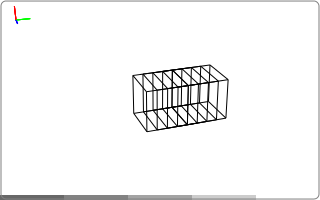
As discussed above, the ts.translate function creates a translation
transform. The animation you see is generated by the code below.
import tomosipo as ts
import numpy as np
vg = ts.volume(size=1.0).to_vec()

t = np.linspace(0, 1, 5)
T = ts.translate(axis=(0, 1, 0), alpha=t)
ts.svg(T * vg).save("./doc/img/topics_transforms_translate.svg")
Rotate
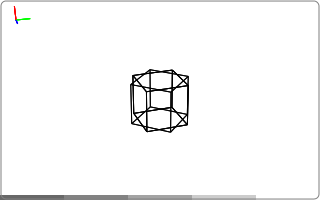
The ts.rotate function creates a
rotation transform. The animation you see is generated by the code below.
import tomosipo as ts
import numpy as np
vg = ts.volume(size=1.0).to_vec()

t = np.linspace(0, 1, 5)

R = ts.rotate(pos=0, axis=(1, 0, 0), angles=np.pi * t)
ts.svg(R * vg).save("./doc/img/topics_transforms_rotate.svg")
Scale
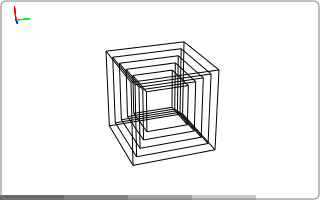
The ts.scale function creates a
scaling transform. The animation you see is generated by the code below.
import tomosipo as ts
import numpy as np
vg = ts.volume(size=1.0).to_vec()

t = np.linspace(0, 1, 5)

S = ts.scale((1, 1, 1), alpha=1 + t)
ts.svg(S * vg).save("./doc/img/topics_transforms_scale.svg")
Reflect
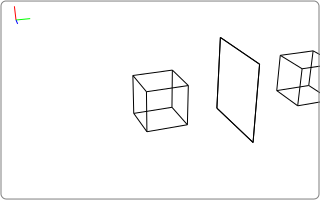
The ts.reflect function creates a
reflection transform. The animation you see is generated by the code below.
import tomosipo as ts
import numpy as np
vg = ts.volume(size=1.0).to_vec()

t = np.linspace(0, 1, 5)

mirror = ts.volume(pos=(0, 2, 0), size=(2, 0, 2))
M = ts.reflect(pos=mirror.pos, axis=(0, 1, 0))
ts.svg(
  vg,
  M * vg,
  mirror,
).save("./doc/img/topics_transforms_reflect.svg")
To / from perspective
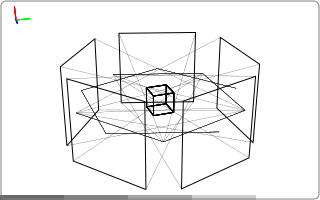
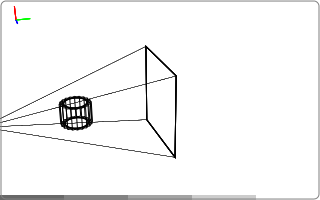
The functions
ts.to_perspective and
ts.from_perspective create perspective transforms. The animation you see are generated by the code below.
import tomosipo as ts
import numpy as np
vg = ts.volume(size=0.5).to_vec()
pg = ts.cone(angles=5, size=2, src_orig_dist=2, src_det_dist=4).to_vec()

ts.svg(vg, pg).save("./doc/img/topics_transforms_perspective1.svg")

P = ts.from_perspective(vol=pg.to_vol())

ts.svg(P * vg, P * pg).save("./doc/img/topics_transforms_perspective2.svg")